



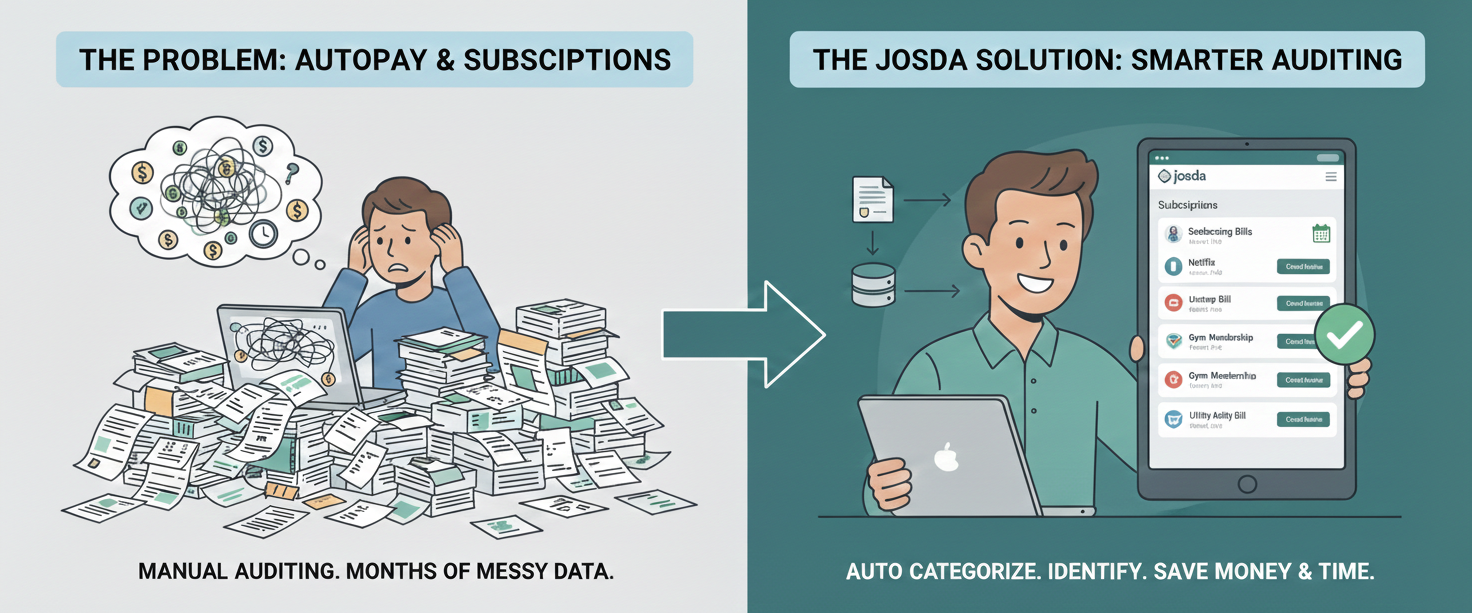
Here’s the truth: autopay does not care that someone died. If you don’t stop it, it will keep pulling money—quietly, reliably, and month after month—until the account runs dry or someone notices.
As an executor (or the person doing executor-level work), your job isn’t just to “cancel subscriptions.” It’s to prove you found them, decide which ones should continue, stop the rest, and document everything so beneficiaries, attorneys, and accountants aren’t cleaning up avoidable mess later.
Below is the practical workflow—first the old way, then the Josda way.
What You’re Actually Trying to Accomplish
A proper autopay/subscription audit produces four outcomes:
- A complete list of recurring charges (monthly, quarterly, annual, and “once a year but big”).
- A decision for each charge: keep temporarily, cancel, or convert to estate billing.
- Proof: who you contacted, when, what they said, confirmation numbers, and refunds (if any).
- A cleaner monthly burn rate while the estate is being settled.
Without Josda: The Manual Process (And Why It Gets Messy)
This is what most executors end up doing—usually in scattered notes, emails, and half-finished spreadsheets:
- Identify every payment source
- Bank accounts (checking/savings)
- Credit cards (including cards on file)
- PayPal/Venmo and other wallets
- Apple/Google app store subscriptions (often overlooked)
- Collect a full year of statements
- Download PDFs (or request them)
- Rename files so you can find them later
- Track which months are missing
- Build your own “recurring charges” spreadsheet
- Vendor name, amount, cadence, account used, category, notes
- Manually scan each statement line-by-line
- Guess whether a charge is recurring or one-time
- Hunt down context
- What is this charge?
- Is it essential (utilities, insurance) or optional (subscriptions)?
- Is it tied to something you shouldn’t cancel yet (phone number, cloud storage, security system)?
- Cancel, negotiate, or convert billing
- Log into random accounts (if you can)
- Call vendors and wait on hold
- Send emails and hope they respond
- Try to document it all
- Confirmation emails saved “somewhere”
- Notes in a notebook
- A spreadsheet that doesn’t reflect real-time status
Where it breaks down: you end up repeating work, losing proof, and missing charges that are small, infrequent, or disguised (annual renewals, app store bundles, “billing descriptor” name changes).
With Josda: The Same Outcome, With Less Work and Better Proof
Josda is built for exactly this kind of executor workload: high volume, high ambiguity, lots of documentation, and a need for clean records.
Instead of manually auditing everything, you can:
- Upload PDFs of statements (the raw source of truth).
- Ask Josda to review them and extract recurring charges and patterns.
- Create a liability record in the application for each subscription/autopay item you need to track.
- Keep the statement PDF and cancellation proof attached to the liability so your documentation stays tight.
The Josda Workflow: Auditing a Year of Statements, Step by Step
Step 1: Pick the accounts that actually matter
Start with the payment rails that are most likely to contain subscriptions:
- The decedent’s primary credit card(s)
- The checking account used for autopay bills
- Any card used for app store purchases (Apple/Google)
In Josda, treat this as your “scope.” If you don’t include an account, you’re implicitly choosing not to find what’s on it.
Step 2: Upload the statement PDFs (don’t overthink it)
Upload the PDFs for the last 12 months for each account. If you only have time for a first pass, upload the last 3 months first—then expand to a year once you’ve caught the obvious items.
Best practice: name uploads clearly (e.g., “Chase Visa – 2025-03 Statement”). The goal is fast retrieval later when someone asks, “Where did this come from?”
Step 3: Ask Josda to do what computers are good at
Once the statements are uploaded, prompt Josda to extract what you need. For example:
- “Review these statements and list all recurring charges. For each, estimate cadence (monthly/annual), typical amount, and first/last month seen.”
- “Flag charges that look like annual renewals, trials converting to paid plans, or charges that changed amount.”
- “Group recurring charges into categories: utilities, insurance, subscriptions, memberships, software, storage, donations, and ‘unknown—needs investigation.’”
- “Identify anything that looks like it could be fraud or an unfamiliar merchant descriptor.”
This is where you stop being a human highlighter and start acting like an executor: reviewing decisions, not extracting data.
Step 4: Use Josda to draft the “execution work”
Once you know what needs to be canceled, Josda can help you move faster and cleaner:
- Draft an email to cancel a service (and request confirmation)
- Draft a call script for phone cancellations
- Draft a refund request when services continued after date of death
- Generate a checklist of what information a vendor will ask for (account number, service address, date of death, executor authority)
You still do the outreach—but you stop staring at a blank page or fumbling on calls.
Step 5: Run a confirmation pass the next month
After cancellations, check the next statement cycle (or bank activity) to confirm charges stopped. If they didn’t:
- Update the liability status
- Add the new statement proof
- Escalate (second contact, dispute, stop payment if appropriate)
Executors get into trouble when they assume “cancel requested” means “canceled.” Your proof matters.
What People Miss (Even When They Try Hard)
If you want a thorough audit, deliberately look for:
- Annual renewals (often show up once and vanish—until next year)
- App store subscriptions (Apple/Google bundle charges)
- Small monthly charges (the silent budget killers)
- Membership dues and donations (often recurring)
- Insurance premiums (may be essential to keep temporarily)
- Cloud storage / phone plans (canceling too early can delete data you still need)
Josda is particularly helpful here because pattern recognition across months is exactly the kind of work humans do poorly when tired.
Closing: This Is About Control, Not Cancellation
A subscription audit isn’t “busywork.” It’s one of the fastest ways to reduce estate burn rate and demonstrate executor diligence.
If you want to do this the clean way: create the liabilities in Josda, attach the statements, and use Josda to extract, explain, and help you execute.
You’ll move faster, miss less, and have a defensible record if anyone asks how carefully you handled the estate.



.svg)
.svg)
.svg)
.svg)